matt here with another gun. This is the steyr AUG with sound wave. I also made a scope, but the red dot is a little off, but i was in a rush so i couldn't fix it! Sorry D:
Anyways, thanks for downloading and enjoy
Matt1331 Steyr AUG
-
matt1331
Deuced Up - Posts: 72
- Joined: Tue Jul 30, 2013 10:42 pm
Attachments
Mastt1331 Steyr AUG.rar
(76.86 KiB) Downloaded 319 times
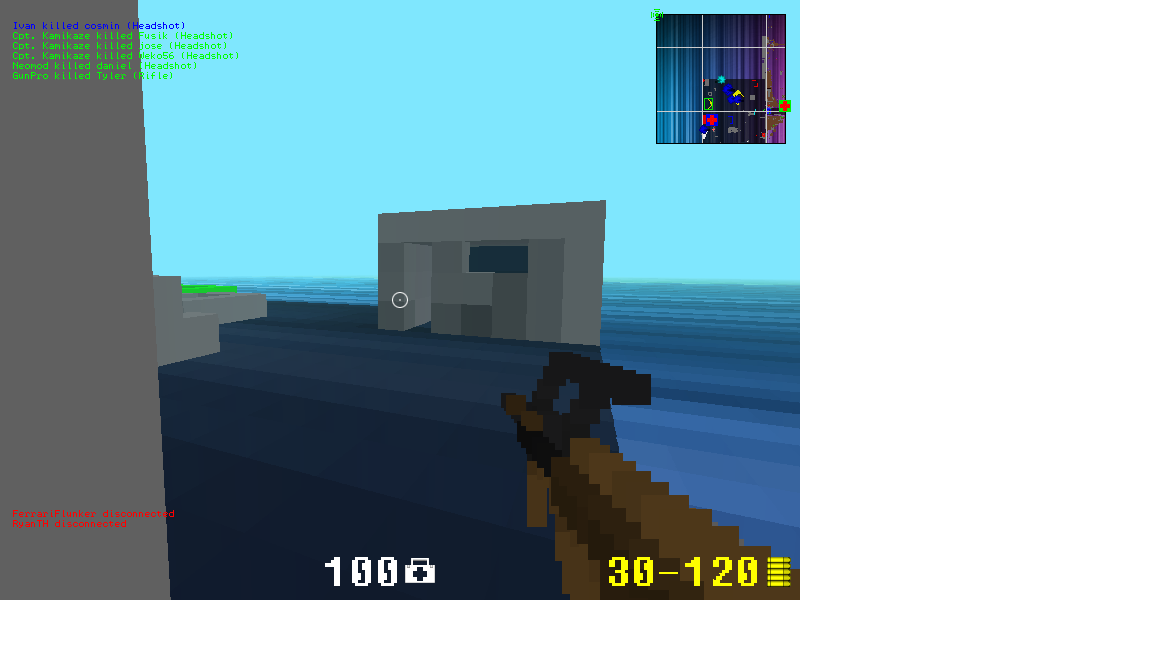
AUG in game.png (86.96 KiB) Viewed 6445 times
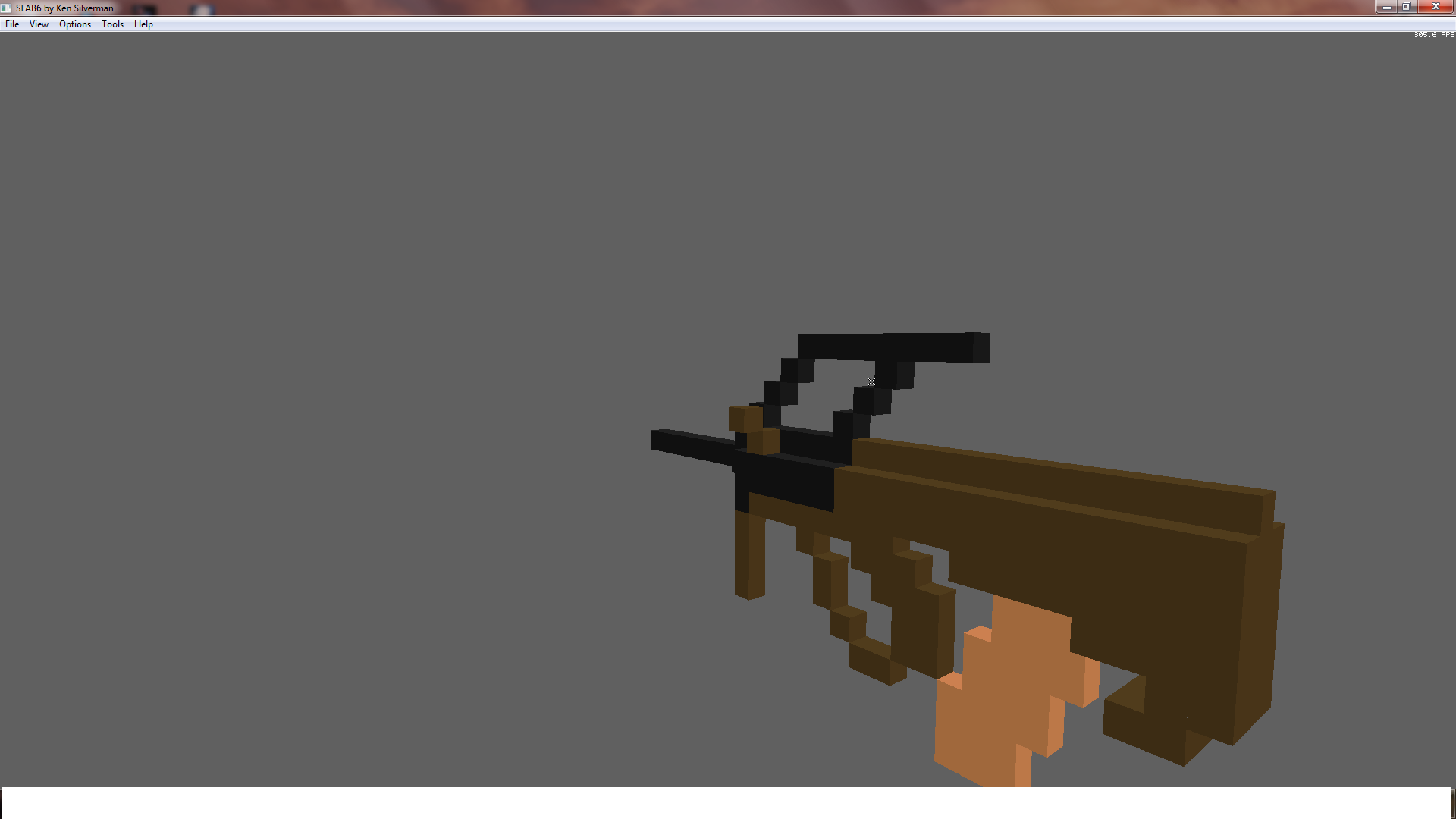
aug slab6.png (73.77 KiB) Viewed 6445 times
(76.86 KiB) Downloaded 319 times
AUG in game.png (86.96 KiB) Viewed 6445 times
aug slab6.png (73.77 KiB) Viewed 6445 times


-
Mr.CS

Blue Master Race
- Posts: 513
- Joined: Wed Jul 03, 2013 2:54 pm
Me Like -csjr

Latest Mod: L96A1 2 People Approve it!
-
Nikhao
League Champs
- Posts: 1397
- Joined: Wed Nov 21, 2012 1:18 pm
Very nice c:
King|Acetheking (Blue): Oh Nikhao is a trusted player? Will lets make him loose trusted
Komrade master clan
love you spring
-
Zekamalikyd

Modder
- Posts: 4219
- Joined: Mon Apr 01, 2013 3:40 pm
take the scope 1 voxel down pl0x?
<podbiel> zeka did nothing wrong

Shia LaBeouf wrote:hahaha i fucking love dick holy shit stuff it in every hole of mine
-
matt1331
Deuced Up - Posts: 72
- Joined: Tue Jul 30, 2013 10:42 pm
Zekamalikyd wrote:take the scope 1 voxel down pl0x?Ok, but it might look smaller in game :L
-
matt1331
Deuced Up - Posts: 72
- Joined: Tue Jul 30, 2013 10:42 pm
Do you guys think i should make one big thread with all my guns? And do i put that in weapons or packs?
-
Mr.CS
Blue Master Race - Posts: 513
- Joined: Wed Jul 03, 2013 2:54 pm
matt1331 wrote:Do you guys think i should make one big thread with all my guns? And do i put that in weapons or packs?Yep
Latest Mod: L96A1 2 People Approve it!
-
matt1331
Deuced Up - Posts: 72
- Joined: Tue Jul 30, 2013 10:42 pm
Mr.CS wrote:The thing is, im still kinda new, and i don't know how to upload pictures for your guns like how you do it. How do you make it so that when i click your signature picture, it opens up your pack thread?matt1331 wrote:Do you guys think i should make one big thread with all my guns? And do i put that in weapons or packs?Yep
and how do you make it so to that the pictures don't have that white background like what i do when i upload my pictures. And how are you able to add a picture, then a description, then another picture and description? And how do you add the cool text onto your pictures? Can you please teach?

-
AriaKanzaki

Blue Master Race - Posts: 30
- Joined: Wed Jul 17, 2013 8:52 pm
Decent and refined design for your very first modification. 
1. As for placing a signature that would direct to your thread, you would first upload the correlating image to imgur and then proceed on with obtaining the image's "linked BBcode". Once you receive the BBcode, modify its URL extension to the link of your page ().
example:
3. Formatting your post with flexible text and image positions can be accomplished by not using the "attachments" feature, but by uploading your image with its imgur link (BBcode).
4. If you wish to publish your images in a professional, elegant style similar to SNPR, Gimp and Adobe Photoshop are applicable, dexterous programs used to implement shading, text, and other artistic aspects (just don't edit a screenshot too much as it might become a false example as to how immaculate the skin really is).
1. As for placing a signature that would direct to your thread, you would first upload the correlating image to imgur and then proceed on with obtaining the image's "linked BBcode". Once you receive the BBcode, modify its URL extension to the link of your page ().
example:
Code: Select all
result: [URL=http://imgur.com/HrQ82J4][img]http://i.imgur.com/HrQ82J4.png[/img][/url]Code: Select all
2. Presenting your image without a white background requires that you set the dimensions of your image properly. Ex: image is 800x600, so that picture should be formatted as 800x600 (I''m assuming that you copied your screenshot to Microsoft Paint and saved it with larger resolution values). You could also just capture your raw image directly (creates the file automatically) by utilizing Fraps or other screenshot programs.[url=http://buildandshoot.com/viewtopic.php?f=9&t=5284][img]http://i.imgur.com/HrQ82J4.png[/img][/url]"3. Formatting your post with flexible text and image positions can be accomplished by not using the "attachments" feature, but by uploading your image with its imgur link (BBcode).
4. If you wish to publish your images in a professional, elegant style similar to SNPR, Gimp and Adobe Photoshop are applicable, dexterous programs used to implement shading, text, and other artistic aspects (just don't edit a screenshot too much as it might become a false example as to how immaculate the skin really is).
IGN - AriaKanzaki; <CTRL>Aria
[07:53] <@Aria|maybehere> Kuma horny.
[07:53] <@Kuma> lolwut
[07:54] <@Aria|maybehere> So pure as well...
[07:54] <@Kuma> yea i am getting horny

-
Nikhao
League Champs - Posts: 1397
- Joined: Wed Nov 21, 2012 1:18 pm
testinnovation wrote:Decent and refined design for your very first modification.^
1. As for placing a signature that would direct to your thread, you would first upload the correlating image to imgur and then proceed on with obtaining the image's "linked BBcode". Once you receive the BBcode, modify its URL extension to the link of your page ().
example:Code: Select allresult:[URL=http://imgur.com/HrQ82J4][img]http://i.imgur.com/HrQ82J4.png[/img][/url]Code: Select all2. Presenting your image without a white background requires that you set the dimensions of your image properly. Ex: image is 800x600, so that picture should be formatted as 800x600 (I''m assuming that you copied your screenshot to Microsoft Paint and saved it with larger resolution values). You could also just capture your raw image directly (creates the file automatically) by utilizing Fraps or other screenshot programs.[url=http://buildandshoot.com/viewtopic.php?f=9&t=5284][img]http://i.imgur.com/HrQ82J4.png[/img][/url]"
3. Formatting your post with flexible text and image positions can be accomplished by not using the "attachments" feature, but by uploading your image with its imgur link (BBcode).
4. If you wish to publish your images in a professional, elegant style similar to SNPR, Gimp and Adobe Photoshop are applicable, dexterous programs used to implement shading, text, and other artistic aspects (just don't edit a screenshot too much as it might become a false example as to how immaculate the skin really is).
King|Acetheking (Blue): Oh Nikhao is a trusted player? Will lets make him loose trusted
Komrade master clan
love you spring
-
matt1331
Deuced Up - Posts: 72
- Joined: Tue Jul 30, 2013 10:42 pm
SNPR wrote:How do i make fraps take a screenshot of only 800x600 pixels?testinnovation wrote:Decent and refined design for your very first modification.^
1. As for placing a signature that would direct to your thread, you would first upload the correlating image to imgur and then proceed on with obtaining the image's "linked BBcode". Once you receive the BBcode, modify its URL extension to the link of your page ().
example:Code: Select allresult:[URL=http://imgur.com/HrQ82J4][img]http://i.imgur.com/HrQ82J4.png[/img][/url]Code: Select all2. Presenting your image without a white background requires that you set the dimensions of your image properly. Ex: image is 800x600, so that picture should be formatted as 800x600 (I''m assuming that you copied your screenshot to Microsoft Paint and saved it with larger resolution values). You could also just capture your raw image directly (creates the file automatically) by utilizing Fraps or other screenshot programs.[url=http://buildandshoot.com/viewtopic.php?f=9&t=5284][img]http://i.imgur.com/HrQ82J4.png[/img][/url]"
3. Formatting your post with flexible text and image positions can be accomplished by not using the "attachments" feature, but by uploading your image with its imgur link (BBcode).
4. If you wish to publish your images in a professional, elegant style similar to SNPR, Gimp and Adobe Photoshop are applicable, dexterous programs used to implement shading, text, and other artistic aspects (just don't edit a screenshot too much as it might become a false example as to how immaculate the skin really is).
-
Mr.CS
Blue Master Race - Posts: 513
- Joined: Wed Jul 03, 2013 2:54 pm
Adobe Photoshop <3
Latest Mod: L96A1 2 People Approve it!
-
matt1331
Deuced Up - Posts: 72
- Joined: Tue Jul 30, 2013 10:42 pm
testinnovation wrote:Decent and refined design for your very first modification.I don't get how to do the signature. I made my thread that has all my weapons, i copied that link. I went into my user control panel and went to signature. Then i clicked url, and in between the URLs i pasted my pack address. Then i copied my image that i uploaded from imgur.com and i pasted that next to it. When i click preview. I see my picture but the link is on top of the picture
1. As for placing a signature that would direct to your thread, you would first upload the correlating image to imgur and then proceed on with obtaining the image's "linked BBcode". Once you receive the BBcode, modify its URL extension to the link of your page ().
example:Code: Select allresult:[URL=http://imgur.com/HrQ82J4][img]http://i.imgur.com/HrQ82J4.png[/img][/url]Code: Select all2. Presenting your image without a white background requires that you set the dimensions of your image properly. Ex: image is 800x600, so that picture should be formatted as 800x600 (I''m assuming that you copied your screenshot to Microsoft Paint and saved it with larger resolution values). You could also just capture your raw image directly (creates the file automatically) by utilizing Fraps or other screenshot programs.[url=http://buildandshoot.com/viewtopic.php?f=9&t=5284][img]http://i.imgur.com/HrQ82J4.png[/img][/url]"
3. Formatting your post with flexible text and image positions can be accomplished by not using the "attachments" feature, but by uploading your image with its imgur link (BBcode).
4. If you wish to publish your images in a professional, elegant style similar to SNPR, Gimp and Adobe Photoshop are applicable, dexterous programs used to implement shading, text, and other artistic aspects (just don't edit a screenshot too much as it might become a false example as to how immaculate the skin really is).
Who is online
Users browsing this forum: No registered users and 4 guests