Hey guys,
My brother wants to make a map, but is really at a loss for where to start. I have these threads open:
http://www.aceofspadeswiki.com/index.php/Mapping
http://www.buildandshoot.com/viewtopic. ... itor#p3277
http://www.buildandshoot.com/viewtopic. ... oxed#p2299
http://www.buildandshoot.com/viewtopic. ... oxed#p2455
And I've also shown him to the download for the bitmap converter.
I have these questions:
Where should he start designing a map, in GIMP or a comparable bitmap editor?
What is a heightmap, and how should he make one?
If and when should he use SLAB6?
Any other general map-making tips would be helpful as well.
My Brother wants to make a map
-
Caesar
Deuce - Posts: 1
- Joined: Mon Dec 31, 2012 8:48 pm
-
Influx

Mapper
- Posts: 163
- Joined: Sat Dec 15, 2012 5:11 pm
To make a map, there a lots of steps to take. Here, I'll outline the basic gist of them;
Before making the map
- Get an idea for a theme for the map (it's no good saying "I want to make a map" without some idea of what you want to do)
- Plan the map layout, either in your head or on paper. Doesn't need to be a plan of the entire map, but you should have an idea of the routes of attack, the focal points, what structures you want, etc.
Making the map
Heightmaps and Colourmaps
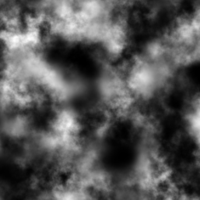
- Create or find a heightmap that's suitable. What I usually do is find a heightmap on the internet and then modify it to suit my purpose. This is an example of a heightmap. The white parts are the highest points and the black parts are the lowest points.
- Create a colour map to go with the heightmap. This will basically be 'painted' on top of the heightmap once the map is generated and give each block a colour. (I use GIMP to edit the heightmap and create the colourmap)
- Run it through Bildramer's Coverter to generate a .vxl file.
- Don't be afraid of having to go back and tweak the heightmap/colourmap and regenerating it until it works. Nothing's ever perfect first time. I know I've always had to re-do heightmaps and colourmaps many times before I'm satisfied with them.
Structures
- Open up Slab6 and create every structure you think you'll need (trees/buildings/etc) and save them as a .kvx.
- Import them into your map by pressing the U key in VoxEd. Move them around and rotate them by using the numberpad keys.
- Once you're done, save and upload.
- Also don't be scared of taking critisisms on board. If people say something should be changed, you should consider changing it, or at least keep their critisism in mind when creating your next map.
- Another thing; Don't rush it. No good maps have ever come from rushing it out the door. The things that make a lot of maps stand out - quality and attention to detail, don't just happen by chance. They require time and effort, and maps really reflect how much effort was put into making it.
Hope that helps.
Before making the map
- Get an idea for a theme for the map (it's no good saying "I want to make a map" without some idea of what you want to do)
- Plan the map layout, either in your head or on paper. Doesn't need to be a plan of the entire map, but you should have an idea of the routes of attack, the focal points, what structures you want, etc.
Making the map
Heightmaps and Colourmaps
- Create or find a heightmap that's suitable. What I usually do is find a heightmap on the internet and then modify it to suit my purpose. This is an example of a heightmap. The white parts are the highest points and the black parts are the lowest points.
- Create a colour map to go with the heightmap. This will basically be 'painted' on top of the heightmap once the map is generated and give each block a colour. (I use GIMP to edit the heightmap and create the colourmap)
- Run it through Bildramer's Coverter to generate a .vxl file.
- Don't be afraid of having to go back and tweak the heightmap/colourmap and regenerating it until it works. Nothing's ever perfect first time. I know I've always had to re-do heightmaps and colourmaps many times before I'm satisfied with them.
Structures
- Open up Slab6 and create every structure you think you'll need (trees/buildings/etc) and save them as a .kvx.
- Import them into your map by pressing the U key in VoxEd. Move them around and rotate them by using the numberpad keys.
- Once you're done, save and upload.
- Also don't be scared of taking critisisms on board. If people say something should be changed, you should consider changing it, or at least keep their critisism in mind when creating your next map.
- Another thing; Don't rush it. No good maps have ever come from rushing it out the door. The things that make a lot of maps stand out - quality and attention to detail, don't just happen by chance. They require time and effort, and maps really reflect how much effort was put into making it.
Hope that helps.
Who is online
Users browsing this forum: No registered users and 8 guests