Page 1 of 1
*How to get fullscreen in windows 7*
Posted: Sun Nov 24, 2013 10:32 pm
by PaternGod
it took me a while to get to full screen on my hp laptop.My native resolution is 1600x900 but i coudn't get it.
Finally I figured out how to solve this problem.
-1. go to your config file in ace of spades folder,you will have something like this, change 800 to 1366 and 600 to 768.
And for windowed put 1instead of 0.
xres = 800
yres = 600
vol = 10
inverty = 0
windowed = 0
it should look like this after you made changes*(go to file and click on save)*.
xres = 1366
yres = 768
vol = 10
inverty = 0
windowed = 1
After that choose your server and you will get windowed aos screen,
http://goo.gl/UxPRsT <---follow this step and you and you're done.
Enjoy playing in fullscreen

Re: *How to get fullscreen in windows 7*
Posted: Sun Nov 24, 2013 10:41 pm
by MKU
When you install Ace of Spades, it's automatically in fullscreen.
Re: *How to get fullscreen in windows 7*
Posted: Sun Nov 24, 2013 10:47 pm
by PaternGod
yes but it look like this

You have this black space on left and right site,if you follow my tut you dont have this you have "real" fullscreen.
I hope you understand what i wanna say.
Re: *How to get fullscreen in windows 7*
Posted: Sun Nov 24, 2013 10:49 pm
by MKU
That's your GPU settings. You have to change your aspect ratio in your GPU control panel/center/thing.
Re: *How to get fullscreen in windows 7*
Posted: Sun Nov 24, 2013 10:52 pm
by ThisFrickinSite
What kind of game are you playing at?
windowed = 1
After that choose your server and you will get windowed aos screen,http://goo.gl/UxPRsT <---follow this step and you and you're done.
Re: *How to get fullscreen in windows 7*
Posted: Sun Nov 24, 2013 10:56 pm
by PaternGod
Yes, but my native gpu resolution is 1600x900 and i dont wonna change it, also its hard to make tutorial about changing gpu resolution due to the fact that many people have different gpu-s.
Re: *How to get fullscreen in windows 7*
Posted: Sun Nov 24, 2013 10:57 pm
by MKU
PaternGod wrote:Yes, but my native gpu resolution is 1600x900 and i dont wonna change it, also its hard to make tutorial about changing gpu resolution due to the fact that many people have different gpu-s.
I'm gonna pretend that you know how a GPU works and post this for reference.
http://www.buildandshoot.com/viewtopic.php?t=6503
Re: *How to get fullscreen in windows 7*
Posted: Sun Nov 24, 2013 11:09 pm
by PaternGod
Thats why i put 1366 x768 for resolution so its enough sharp when i "strech it".
Re: *How to get fullscreen in windows 7*
Posted: Sun Dec 01, 2013 5:45 pm
by Chronocide Commando
PaternGod wrote:you have "real" fullscreen.
You mean widescreen, not fullscreen.
MKU wrote:That's your GPU settings. You have to change your aspect ratio in your GPU control panel/center/thing.
GPU settings only let you choose between black bars and horizontally stretched image.
By setting a widescreen resolution you can get everything rendered correctly in widescreen.
However, the game only supports resolutions up to 1280 wide and 960 high, so 1366x768 will be set to 1280x768 and you'll still get either black bars or stretching, though to a lesser extent.
So the highest widescreen (16:9) resolution supported by AoS would be 1280x720. But AoS skips frames at high resolutions, so the best widescreen resolution for 1600x900 display would be 1066x600 or even 800x450. But setting non-standard resolutions like these could be tricky, especially if it's a laptop display. You will also have to adjust your sights as they will likely become distorted in widescreen.
Most importantly, in widescreen AoS crops the image vertically instead of extending it on the sides. So your vertical field of view is actually
less.
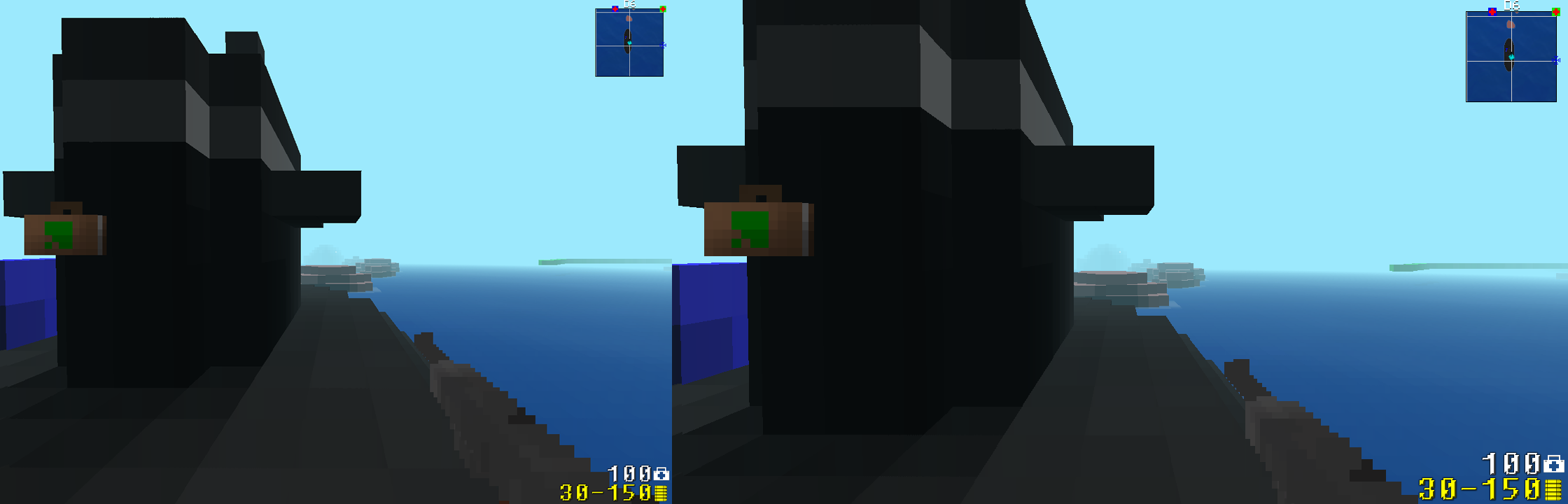
Untitled-8.png (138.4 KiB) Viewed 7626 times
Note how you can't see the sky above the building in the second screenshot.
On the other hand, this way everything looks larger, so it may be easier to hit distant targets.