Error with Launcher (Unhandled Exception)

Comments and suggestions about the BuildAndShoot.com website.
2 posts Page 1 of 1 First unread post
lightupman
Deuce
Posts: 1
Joined: Fri Jul 19, 2013 7:23 am


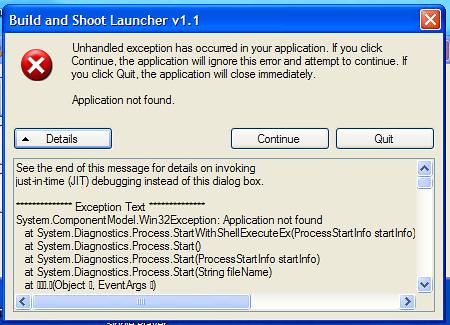
So, I just got this today, not having a previous installation of the launcher or even the original Ace of Spades on this computer. (upgraded my computer 2 months back, so it's only 4 years outdated now :P.) Anyways, I have to think it's because this is windows XP, I don't have the money right now to buy Windows 7, I have windows vista but refuse to upgrade because it sucks ass. I had it once, really it was TERRIBLE. So, Basically I can start the launcher, access everything, but when I click Play, it goes to this (image link): The crash log just spews out this:
Spoiler:
See the end of this message for details on invoking
just-in-time (JIT) debugging instead of this dialog box.

************** Exception Text **************
System.ComponentModel.Win32Exception: Application not found
at System.Diagnostics.Process.StartWithShellExecuteEx(ProcessStartInfo startInfo)
at System.Diagnostics.Process.Start()
at System.Diagnostics.Process.Start(ProcessStartInfo startInfo)
at System.Diagnostics.Process.Start(String fileName)
at   .(Object , EventArgs )
at System.Windows.Forms.Control.OnClick(EventArgs e)
at System.Windows.Forms.Button.OnClick(EventArgs e)
at System.Windows.Forms.Button.OnMouseUp(MouseEventArgs mevent)
at System.Windows.Forms.Control.WmMouseUp(Message& m, MouseButtons button, Int32 clicks)
at System.Windows.Forms.Control.WndProc(Message& m)
at System.Windows.Forms.ButtonBase.WndProc(Message& m)
at System.Windows.Forms.Button.WndProc(Message& m)
at System.Windows.Forms.Control.ControlNativeWindow.OnMessage(Message& m)
at System.Windows.Forms.Control.ControlNativeWindow.WndProc(Message& m)
at System.Windows.Forms.NativeWindow.Callback(IntPtr hWnd, Int32 msg, IntPtr wparam, IntPtr lparam)


************** Loaded Assemblies **************
mscorlib
Assembly Version: 2.0.0.0
Win32 Version: 2.0.50727.3649 (GDR.050727-3600)
CodeBase: file:///c:/WINDOWS/Microsoft.NET/Framework/v2.0.50727/mscorlib.dll
----------------------------------------
Launcher_Merged
Assembly Version: 1.1.0.0
Win32 Version: 1.1.0.0
CodeBase: file:///C:/Program%20Files/Build%20and%20Shoot/Launcher.exe
----------------------------------------
System.Windows.Forms
Assembly Version: 2.0.0.0
Win32 Version: 2.0.50727.3645 (GDR.050727-3600)
CodeBase: file:///C:/WINDOWS/assembly/GAC_MSIL/System.Windows.Forms/2.0.0.0__b77a5c561934e089/System.Windows.Forms.dll
----------------------------------------
System
Assembly Version: 2.0.0.0
Win32 Version: 2.0.50727.3644 (GDR.050727-3600)
CodeBase: file:///C:/WINDOWS/assembly/GAC_MSIL/System/2.0.0.0__b77a5c561934e089/System.dll
----------------------------------------
System.Drawing
Assembly Version: 2.0.0.0
Win32 Version: 2.0.50727.3644 (GDR.050727-3600)
CodeBase: file:///C:/WINDOWS/assembly/GAC_MSIL/System.Drawing/2.0.0.0__b03f5f7f11d50a3a/System.Drawing.dll
----------------------------------------
System.Configuration
Assembly Version: 2.0.0.0
Win32 Version: 2.0.50727.3650 (GDR.050727-3600)
CodeBase: file:///C:/WINDOWS/assembly/GAC_MSIL/System.Configuration/2.0.0.0__b03f5f7f11d50a3a/System.Configuration.dll
----------------------------------------
System.Xml
Assembly Version: 2.0.0.0
Win32 Version: 2.0.50727.3650 (GDR.050727-3600)
CodeBase: file:///C:/WINDOWS/assembly/GAC_MSIL/System.Xml/2.0.0.0__b77a5c561934e089/System.Xml.dll
----------------------------------------
gtexz29m
Assembly Version: 2.0.0.0
Win32 Version: 2.0.50727.3644 (GDR.050727-3600)
CodeBase: file:///C:/WINDOWS/assembly/GAC_MSIL/System/2.0.0.0__b77a5c561934e089/System.dll
----------------------------------------

************** JIT Debugging **************
To enable just-in-time (JIT) debugging, the .config file for this
application or computer (machine.config) must have the
jitDebugging value set in the system.windows.forms section.
The application must also be compiled with debugging
enabled.

For example:

<configuration>
<system.windows.forms jitDebugging="true" />
</configuration>

When JIT debugging is enabled, any unhandled exception
will be sent to the JIT debugger registered on the computer
rather than be handled by this dialog box.
So if you can help at all, thank you very much! I really need this, I fell in love with this game, saw it go to steam for money and make it something I didn't want, but I found it again, so please help me play it!
QuantumWraith
Deuce
Posts: 20
Joined: Thu Feb 14, 2013 1:37 pm


I'm having this issue as well. If I discover any way of resolving it, I'll relay it here. So far, no luck, unfortunately.. Blue_NotHappy

Edit: A temporary/permanent workaround I have found thus far:

1. Open your AoS directory (where you installed it).
2. Create a .txt document in the directory and paste this into it: client.exe "LINK ADDRESS HERE" (put the server address in the quotation).
3. Save and rename as runclient.bat
4. Double click runclient
5. Profit

In order to switch servers around, you'll have to constantly edit the .bat file with the address. Though, if that doesn't annoy you, then hopefully this works for you as well as it has for me! Blue_Rifle
2 posts Page 1 of 1 First unread post
Return to “Site Feedback”

Who is online

Users browsing this forum: No registered users and 7 guests